
Here are some of the common issues that we helped troubleshoot when people reported the Tin Canny LearnDash Reporting plugin not working.
Tin Canny Uploader won’t accept my zip file.
If you see the following error when uploading your zip file:

Chances are the zip file wasn’t created correctly. The safest way to do it is from within iSpring’s publish window:
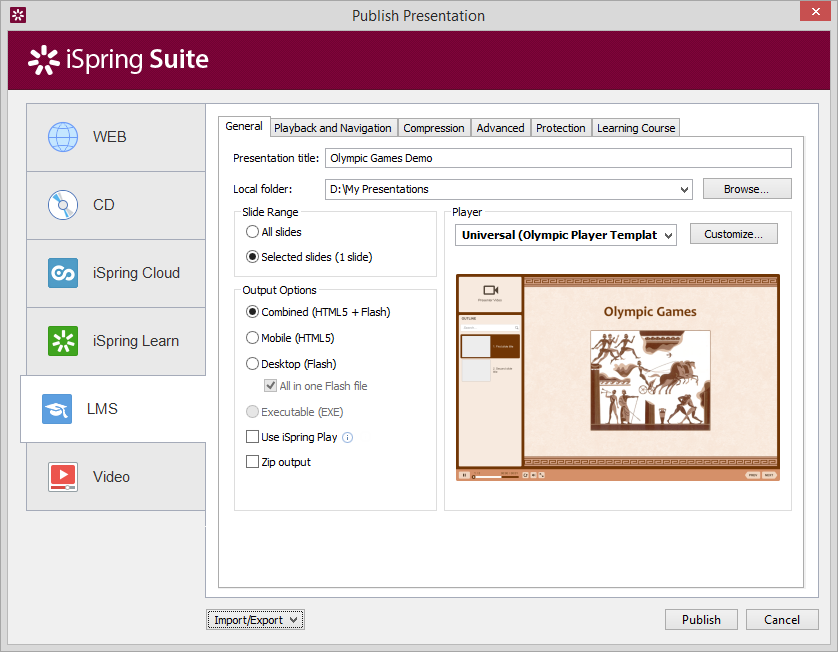
Under the General tab, make sure “Zip output” is checked before you publish your module.
If you create a zip file from your iSpring module’s output folder, make sure you zip only contents within the output folder and NOT the folder itself.
On the Learning Course tab, you can define a custom score to pass the topic, e.g. set it to 80% and the student will only have to see 80% of the slides for TinCan to send the “Passed” TinCan record to LearnDash.
Be aware:
If your module contains a quiz, it seems to be sending two pass/fail records are sent to LearnDash: one for the slide completion and one for the quiz.
This needs more investigation, but I’m putting it out there looking for feedback.k